Hide unwanted channels from YouTube search.
Keep a local list of channels to hide from YouTube search, Home and the sidebar. Optionally hide their comments too. Unlike recommendation feedback, this applies your blocklist to supported search-result cards.
- One permission, one site
- No network requests while it runs
- Import and export the list
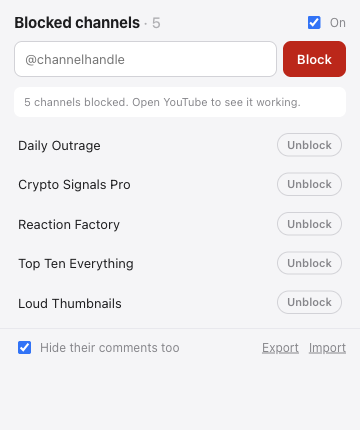
The interface in this capture is the real one. The channel names in it are made up.
What it does
One click on the video
A block button sits on the video tiles YouTube renders, wherever a channel link is inside one. Press it and the channel is on the list.
Search, Home and the sidebar
Hide supported video cards across these pages. Comment hiding is optional. Shorts shelf tiles and videos you deliberately open are not hidden.
The list is yours
Export it, edit it, import it on another machine. It is stored on your computer and nowhere else.
Before you install
Does it send anything anywhere?
No, and the build enforces it: the packaging script fails if fetch, XMLHttpRequest, sendBeacon, WebSocket or EventSource appears in any of the extension's script files. There is no analytics, no error reporting and no licence check, because there is nothing to license.
What does it not block?
It does not hide Shorts shelf tiles or prevent you from deliberately opening a video. In the Shorts player, it can skip blocked channels after the video you opened. This is a page filter, not a parental-control or access restriction tool.
How do I undo a block?
Open the extension popup and click Unblock beside the channel. You can also pause blocking to show the page without changing your saved list.
Will it break when the site changes?
YouTube layout changes can affect detection or the block button. The popup shows a page check and hidden-card count. If blocking stops working, report the affected page type to the support address below; do not send private browsing history.